
Download Fillout – AI‑Powered Form Builder for Surveys, Quizzes & More
Overview: AI‑Driven Form Creation Made Simple
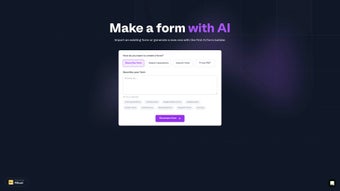
Fillout is a web‑based AI form builder that removes the friction from designing, publishing, and updating online questionnaires. Whether you need a quick customer‑satisfaction survey, an engaging quiz for lead generation, or a detailed registration form for an event, Fillout lets you generate high‑quality questions from a single sentence or a pasted list of topics. The built‑in AI suggests relevant follow‑up questions, optimizes wording for higher response rates, and even creates custom images that match your brand’s visual style.
Importing existing Google Forms is a single click, and the drag‑and‑drop no‑code editor offers theme selection, font adjustments, and color palettes without any HTML knowledge. Continuous updates mean you can tweak wording, add new sections, or change the visual theme on the fly—no need to start from scratch. Language optimization analyzes each question for clarity, bias, and conversion potential, offering refinements that boost completion rates.
The free tier removes the barrier to entry, allowing unlimited form creation with a generous monthly submission limit of 1,000 entries—perfect for startups, educators, and small businesses testing the waters.
Key Features (itemprop="featureList")
- AI‑Generated Questions: Describe your goal or paste a list of topics, and the AI instantly creates well‑structured, relevant questions.
- One‑Click Google Forms Import: Seamlessly migrate existing forms without losing logic or settings.
- No‑Code Visual Editor: Drag‑and‑drop builder with theme libraries, custom color palettes, and brand‑aligned fonts.
- Continuous Form Updates: Edit, reorder, or expand forms at any time; changes are saved instantly and reflected for respondents.
- Language Optimization Engine: AI evaluates wording for clarity, neutrality, and conversion, offering suggestions that raise completion rates.
- AI‑Generated Images & Themes: Automatically produce visuals that match your brand’s identity, eliminating the need for a designer.
- Unlimited Form Creation (Free Plan): Build as many forms as you need; the free tier includes up to 1,000 submissions per month.
- Multi‑Channel Distribution: Share forms via direct link, embed code, QR code, or integrate with platforms like Slack and Zapier.
- Responsive Design: All forms are mobile‑friendly out of the box, ensuring a smooth experience on smartphones and tablets.
- Secure Data Handling: SSL encryption and GDPR‑compliant storage keep respondent data safe.
Installation, Setup & Daily Usage Guide
Getting started with Fillout is straightforward because the tool lives entirely in the browser—there is no heavy software download or complex installation process. Visit fillout.com, create a free account using your email address or Google login, and confirm your email to land on the dashboard.
Step 1 – Choose a Creation Path: Select “Import from Google Forms” to bring an existing questionnaire into Fillout, or pick “AI‑Assist” to let the system generate questions for you. For AI‑Assist, type a brief description of your objective (e.g., “Customer feedback on recent purchase”) and click “Generate.” Within seconds, the AI presents a set of suggested questions.
Step 2 – Refine with the No‑Code Editor: The visual editor appears on the right side. Drag questions to reorder them, toggle required fields, and customize answer types (multiple choice, rating scale, open text, etc.). Choose a pre‑made color scheme or upload your logo; you can also let Fillout create a matching header image automatically.
Step 3 – Optimize Language: Click the “Optimize” button next to any question to see AI‑driven suggestions. The tool highlights ambiguous wording, potential bias, and offers alternatives that are shorter or more persuasive. Accepting a suggestion updates the form instantly.
Step 4 – Publish & Share: Hit “Publish.” Fillout generates a unique URL, an embed snippet for your website, and a QR code for offline distribution. Enable email notifications for each new response or integrate with Zapier to push data into Google Sheets, HubSpot, or other CRMs.
Step 5 – Monitor & Update: The dashboard provides real‑time analytics—submission counts, completion rates, and average time on page. If you notice a drop in engagement, return to the editor, adjust wording or design, and republish. All changes go live without needing to resend the link.
Pros, Cons & Frequently Asked Questions
Pros
- AI‑driven question generation saves hours of manual drafting.
- Free tier offers unlimited forms, ideal for small teams and educators.
- No‑code editor makes customization accessible to non‑technical users.
- Language optimization improves response quality and conversion rates.
- Responsive design ensures a consistent experience across devices.
- Secure, GDPR‑compliant data handling builds trust with respondents.
- Seamless import from Google Forms accelerates migration.
- AI‑generated brand images reduce reliance on external design tools.
Cons
- Advanced features like multi‑language support are limited to paid plans.
- The 1,000‑submission limit on the free tier may be restrictive for high‑traffic campaigns.
- Automation integrations (Zapier, Slack) are only available on higher‑tier subscriptions.
- Complex conditional logic (branching) is less robust compared to dedicated survey platforms.
- Because it’s a web‑only app, offline form creation isn’t possible.
FAQ – Your Most Common Questions Answered
Can I use Fillout on mobile devices?
Yes. Both the editor and published forms are fully responsive, allowing you to design, edit, and view submissions on smartphones, tablets, or any device with a modern browser.
Is there a limit to how many forms I can create on the free plan?
No. The free tier allows unlimited form creation, but you are limited to 1,000 submissions per month across all forms.
How does Fillout ensure the security of collected data?
All data is transmitted over SSL encryption and stored on GDPR‑compliant servers. Premium accounts can enable two‑factor authentication for added protection.
Can I integrate Fillout with my existing CRM?
Yes. Fillout offers native Zapier integration, allowing you to push responses to popular CRMs such as HubSpot, Salesforce, and Pipedrive. Direct API access is available on higher‑tier plans.
What happens if I exceed the 1,000‑submission limit?
When the limit is reached, new submissions are temporarily blocked until the next billing cycle. You can upgrade to a paid plan at any time to raise or remove the limit.
Conclusion & Call to Action
Fillout bridges the gap between powerful form functionality and the simplicity of AI‑driven assistance. Its free plan makes it an attractive option for freelancers, educators, and small businesses that need to launch surveys or quizzes quickly without a steep learning curve. While power users may eventually outgrow the submission limits and crave deeper conditional logic, the core experience—rapid question generation, language optimization, and brand‑consistent design—remains compelling. If you’re looking to reduce the time spent on manual form creation while improving response quality, give Fillout a try today.



.png)



